Adding to Cart & Checkout
How to add approved books to your cart, choose binding, add the Digital Edition or the Audiobook, pick a destination, and complete checkout.
Adding to Cart & Checkout
Once you have approved your book proof — see Approving Your Book — you can add it to your cart. There are three things you can buy for the same book — a printed copy, a Digital Edition (the EPUB and PDF, or the PDF alone for a Journal Edition made only of writing pages) and an Audiobook (an MP3) — and one cart line can carry any combination of them.
Adding to Cart
There are several ways to put a book in your cart:
- Click Add to Cart on the proof review page after approving. This adds a printed copy.
- Click Add to Cart on the book card on your My Books page. This adds a printed copy.
- Click the Digital Edition button on the book card in My Books. The button carries that book’s own price after the words. This adds the Digital Edition on its own, with no printed copy attached. See Digital Editions.
- Click the Audiobook button on the book card in My Books, which shows its price the same way. This adds the MP3 on its own. It appears on books that have a written story. See Audiobooks.
You do not have to decide everything at that moment. Once a book is in the cart you can check and uncheck the Digital Edition and the Audiobook on that same line.
Cart Options
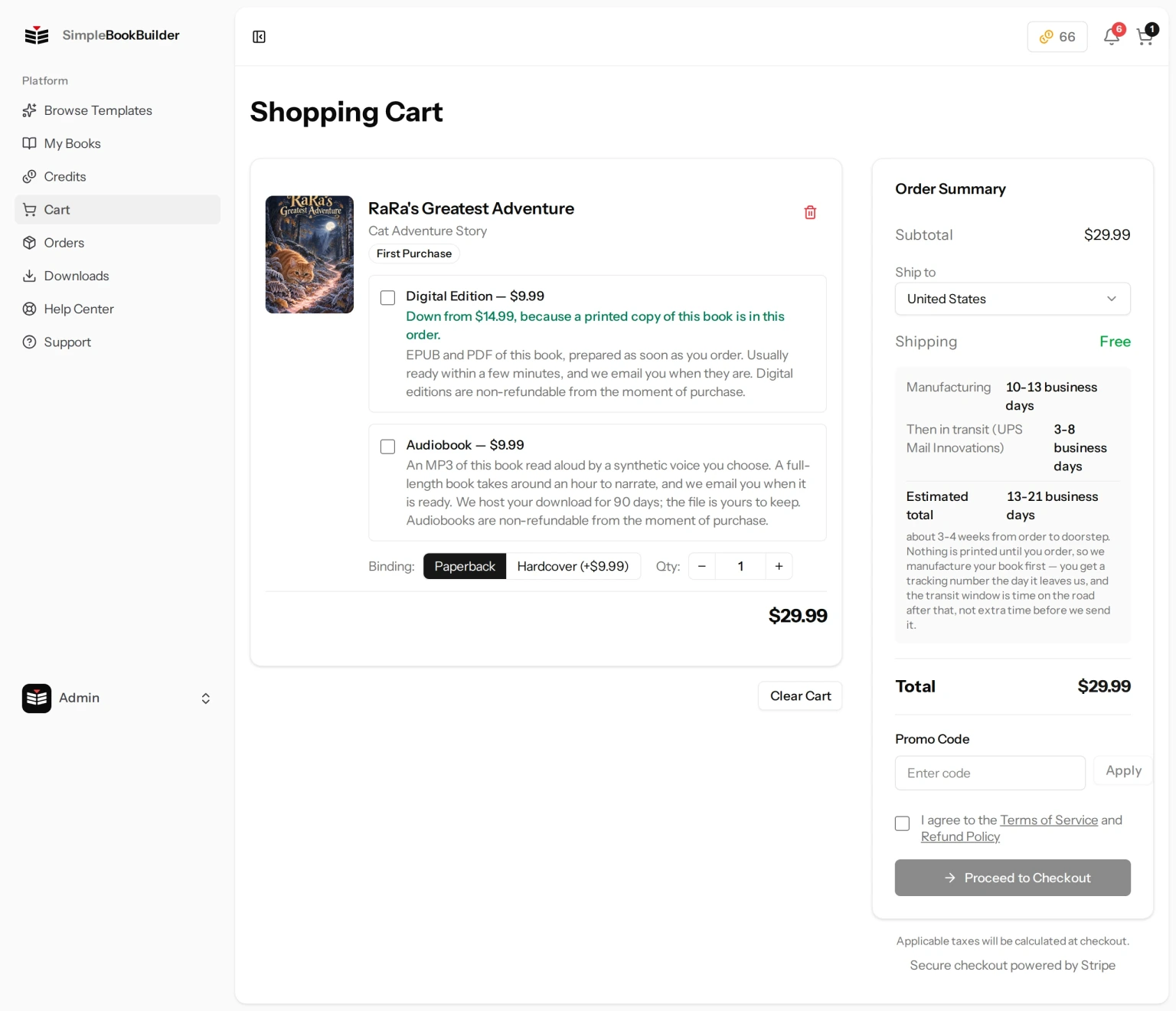
In your cart, each book shows:
- Cover thumbnail and book title.
- Binding toggle — Switch between Paperback and Hardcover. Hardcover costs a bit more, shown as “+$X” on the button. It appears only on a line that includes a printed copy.
- Quantity selector — Use the minus and plus buttons to adjust how many copies you want. The first time you buy a book, the first copy is at the listed price and every copy after it is a lower flat per-copy rate. If you are ordering more copies of a book you have bought before, every copy is at that lower rate, including the first — the listed price covers making the book, and that is already paid for. This also appears only on a line that includes a printed copy: a download-only line has nothing to count, so neither control is shown.
- Digital Edition checkbox — Adds the EPUB and PDF of that same book to the line. A Journal Edition made only of writing pages (lined, dot-grid or blank) comes as a PDF only — an e-reader EPUB of it would have nothing on its pages. The line names the files that book comes as. It is $14.99 on its own, and $9.99 when you buy a printed copy of that book. A printed copy on the same line earns the lower price right there in the cart, and so does one you bought months ago. Beside a printed copy the checkbox appears only when you are ordering from the United States for delivery there; otherwise it is replaced by this sentence: “With a printed copy, the e-book and audiobook can be added to the same order only when you are ordering from the United States for delivery there. You can add them after your order instead, at the same add-on price.”
- Audiobook checkbox — Adds an MP3 of that same book, read aloud by a synthetic voice you choose. It is $14.99 on its own and $9.99 when you are also buying a printed copy of that book, or have bought one before. Owning the Digital Edition does not change the audiobook price — it is a separate product, not part of a bundle. The offer only appears on books that have a written story, and beside a printed copy only when you are ordering from the United States for delivery there, the same as the Digital Edition.
- Narrator — Once the Audiobook is checked, a Narrator dropdown appears on that line listing the 5 voices we offer. Change it as often as you like before you pay; it is fixed once you pay. Underneath it we may also ask “How should we say these names?” for the names in your book, with a Hear it link beside each reading. Skipping that is fine — we then say every name the way it is spelled.
- Price breakdown — Shows the per-copy pricing and total for that item.
Click the trash icon to remove a book from your cart, or use Clear Cart to remove everything.
Destination
The cart has a destination selector. Pick the country the printed books are going to before you check out: it sets the shipping cost and the delivery estimate, and checkout then collects a shipping address in that country. With a printed copy in the cart, a Digital Edition or Audiobook rides along only when you are ordering from the United States and shipping there; otherwise it is removed from the cart, the cart tells you so, and you can add it after your order at the same add-on price. A cart of downloads only is not affected by the destination.
Order Summary
The right sidebar shows your order summary with subtotal, shipping, and total. A Digital Edition or Audiobook line adds nothing to shipping — there is nothing to ship. Click Proceed to Checkout to continue.
Terms Agreement
Before proceeding to checkout, you must check the box confirming that you agree to our Terms of Service and Refund Policy. This is required to place an order. Applicable taxes will be calculated during the Stripe checkout process.
If your cart contains a Digital Edition, a second checkbox appears and is also required: “I understand that digital editions are non-refundable from the moment of purchase. If a file is corrupt, incomplete, or does not match the book I approved, SimpleBookBuilder will repair or re-deliver it at no charge.” We record the exact wording you accepted with your order.
If your cart contains an Audiobook, a third checkbox appears and is also required, with its own wording: “I understand that audiobooks are non-refundable from the moment of purchase, that SimpleBookBuilder hosts my download for 90 days after the recording is ready, and that choosing a different narrator later is a new purchase rather than a refund or an exchange. If the recording is corrupt, incomplete, or does not match the book I approved, SimpleBookBuilder will repair or re-deliver it at no charge.” It is separate from the digital one because the two products differ on how long we host the download and on what happens if you want a different narrator later. Until every box that applies to your cart is checked, the Proceed to Checkout button stays disabled.
Checkout
At checkout you will:
- Agree to the Terms of Service and Refund Policy by checking the required checkbox, plus the digital acknowledgment if your cart holds a Digital Edition and the audiobook acknowledgment if it holds an Audiobook.
- Enter or confirm your shipping address. An order with nothing printed in it skips this part — there is nowhere to ship a download.
- Enter your billing address. This one is asked for on every order, downloads included, because tax on a download is worked out from where the customer is rather than from where a parcel lands. If you are having something printed, this is usually just your shipping address again. If your order is downloads only, you will still be asked for an address here even though nothing is being mailed — that is expected, not a fault.
- Complete payment securely through Stripe. We accept all major credit and debit cards. Applicable taxes are calculated based on your address.
- Receive an order confirmation email with your order details, including an itemized breakdown of your purchase.
Still have a question?
Support tickets are part of your account. Log in or create a free account to open one.