Template Details
Understanding the template detail page — the preview gallery, the editions and their prices, and when you are actually charged.
Template Details
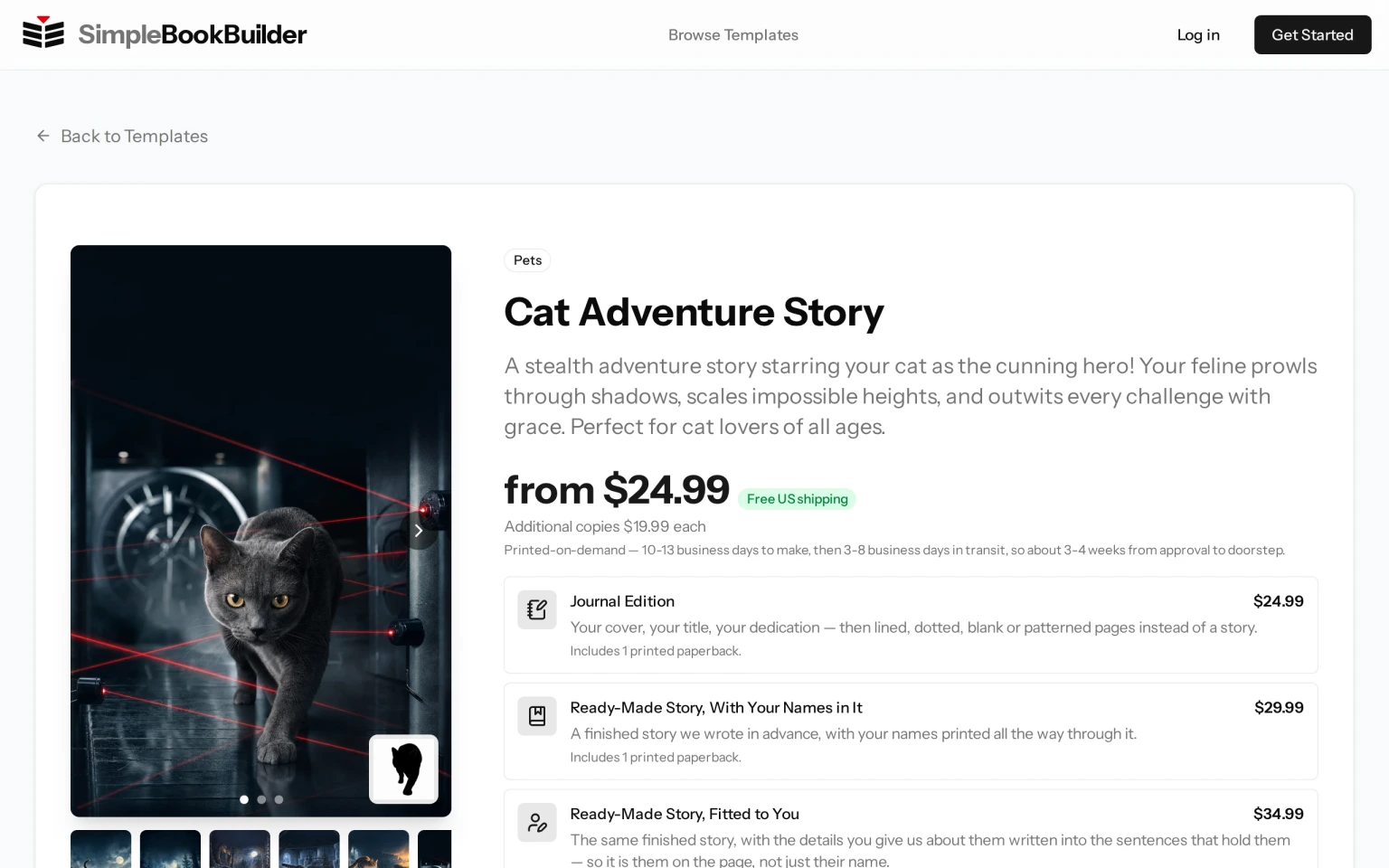
Click any template card to open its detail page, where you can learn everything about the book before you start. The card itself is a link, so there is no separate button to look for — the row of small covers under the picture, and the two arrows that scroll that row along, are the only parts of a card that do something else.
Preview Gallery
The left side of the page shows a preview gallery. A row of small dots sits across the bottom of the picture itself — click one to jump straight to that view. There are also arrows over the picture: one on the left once there is an earlier view to go back to, and one on the right while there is a later one, so at the first and last view you will see only one arrow. Some templates include a short video preview.
Where a template has more than one cover design, a strip of small covers sits under the gallery. Click one and the gallery above it changes to that cover. Whichever cover you are looking at is the one carried into the book when you start, and you can still change it later in the wizard — see Choosing Your Cover Art.
Book Details
The right side shows key information:
- Category badge — Which category this template belongs to.
- Template name — The title of the book template.
- Description — A detailed explanation of what your finished book will be like.
- Price — Where a template sells more than one edition, this is a “from” price: the cheapest edition that template sells. The editions themselves are listed below it, each with its own price.
Beside the price is a Free US shipping badge, and underneath it a line saying how long the book takes to make and how long it is then in transit. Where the template has a set price for extra copies, that per-copy price is shown between the two. Delivery takes longer outside the United States — see Shipping & Delivery Times for the window to each country we ship to.
How Long the Book Is, and Whether It Has Pictures
Every edition that carries a story is a full-length book of words. The cover is the artwork; the story is told in words, not pictures, and none of your photos are printed inside. A book like this says so on the page, in a tile headed Illustrations that reads “Not a picture book” — so check that tile on the template in front of you rather than assuming either way.
The Journal Edition is the one edition that is not a book of words at all: it is the same printed book with no story in it: its pages are lined, dot-grid or blank for writing on, or, where the template offers one, a word style printed on every page. Lined, dot-grid and blank pages ship to the United States and Canada only, so they are offered only when you are browsing from there; anywhere else, or when we cannot tell where you are browsing from, the word styles are the choice.
The page always shows the page range, how many questions you will answer, and how long the book takes to read out loud. Beside those is a Pace tile: one plain sentence rather than a number, worked out from how long one chapter of that book runs when read aloud, not from the size of the whole book. Where a chapter is long it reads “A novel — read over weeks, not in one sitting.” Where a chapter is short enough to finish in one sitting it reads “A chapter fits one bedtime.” Either sentence can sit on a book of a couple of hundred pages, so read the Pages tile beside it for the length of the book itself. Many of our books are full-length novels whose chapters do not fit a single bedtime, so if you are buying for a young child, read the Pace tile before you decide. Where we have stated who a template’s books suit, an Ages tile appears as well.
Our children’s books are chapter books, not short picture books: ten chapters in large, easy-to-read type with generous spacing between the lines, made to be read together a chapter a night, or alone once a child is ready. A color page style tints the page; it never adds pictures to the story.
Editions and Prices
A template does not have one price. It has a short ladder of editions, and you pick one when you create the book. Each edition is listed with its own price and its own promise, so you can see what the difference buys:
- Journal Edition — Your cover, your title and, if you want one, your dedication — then pages with no story: lined, dot-grid or blank to write on, or, where the template offers one, a word style printed on every page. A printed copy with pages to write on ships to the United States and Canada.
- Ready-Made Story, With Your Names in It — A finished story we wrote in advance, with your names printed all the way through it. Other customers receive the same underlying story with their own names in it, so the names are the part that is yours rather than the story itself.
- Ready-Made Story, Fitted to You — The same finished story, with the details you give us about them written into the sentences that hold them — so it is them on the page, not just their name. A ready-made story can only take in the details it was written with room for, so this edition is offered only where the story behind it can actually use them.
- Written For You — A story shaped around your answers and inspired by their life. You approve the full proof before it prints. This is the only edition written after you answer, rather than a manuscript that already existed before you arrived.
Each row of that ladder is a button. Clicking one starts a new book with that edition already chosen, and a row also tells you it includes one printed paperback. If you are not signed in, you will be asked to sign in or create an account first, and we take you on to the book from there.
Every edition gets the same cover art, the same proof, the same approval step and the same printing. They differ in what is on the pages. Extra copies are the same per-copy rate whichever edition you chose.
An edition a template does not sell is simply not there, so a template with two editions shows two. An edition that is paused for a while is shown grayed out, marked “Temporarily unavailable,” and cannot be chosen until it is back.
Downloads Sold Alongside the Book
Under the ladder you may also see a Digital Edition row and an Audiobook row. These are not editions of the book and they are not part of the “from” price. Each is a separate purchase you can make once you have approved your finished book, and each row states its own price and who sells it outside the United States. See Digital Editions and Audiobooks.
Where the sample clips for a template have been made, the page also lets you hear each of the synthetic voices an audiobook can be read in, before you decide.
Picking Which Ready-Made Story You Get
Where a template has ready-made stories, they are listed below the editions under the heading The ready-made stories. Each story is a card giving its title, what happens in it, and any covers drawn for that story. If there are more stories than fit across, two arrows beside the heading scroll the row along.
Clicking a story starts a book with that story already picked, on the Ready-Made Story, With Your Names in It edition. Nothing is decided by clicking: where the page offers more than one edition, the first step of the questionnaire asks you which edition and which story you want, so you can change either one there before you answer anything.
Feature Tiles
A small grid of tiles beside the pictures gives you the facts about the book itself. Which tiles appear depends on the template:
- Pages — The expected page count range for the finished book.
- Creation Time — How long we need before the book is ready for you to review. Where the template also sells the Journal Edition, a smaller line underneath names the much shorter time that one takes. The ready-made editions are quick too, but this tile does not name their time.
- Questions — How many questionnaire questions you will answer.
- Read Aloud — How long the whole book takes to read out loud, with a smaller line underneath giving roughly how many minutes one chapter takes.
- Pace — One sentence about how the book is meant to be read, picked from how long a chapter runs aloud. It is a description, not a duration — the minutes are in the Read Aloud tile.
- Ages — Who the book suits, on the templates where we have stated a reading age or a read-aloud age.
- Illustrations — Appears on a book whose story is told in words, and reads “Not a picture book”.
Getting Started
When you are ready, click the Start Creating button, click the edition you want in the ladder, or click one of the ready-made stories. All three take you into the questionnaire for that template — signing in first if you have not already. Filling Out the Questionnaire walks through the steps that follow. Start Creating names no edition on purpose — take that one if you have not decided yet, and the wizard will ask you.
When you are charged. The book’s own price is paid at checkout, after you have read every page of the proof and approved it. Nothing is printed before that, and no money is taken for the book before that.
Writing the book is separate, and it is usually free: your first book is normally free to generate, and buying a book unlocks your next free one. But if you already have a book waiting to be bought, starting another costs credits: 10 credits for the Written For You edition, and 5 credits for any edition we do not have to write for you — the Journal Edition, whose pages are left for you to fill in, and either ready-made edition, whose story existed before you arrived. Credits are spent when the book starts being made rather than at the end. So it is not true that nothing at all is charged before approval — see Understanding Credits for exactly when credits are used.
Still have a question?
Support tickets are part of your account. Log in or create a free account to open one.