Understanding Credits
What credits are, your free book, your credit balance, and what credits cannot buy — printing, shipping, the Digital Edition and the Audiobook are paid for with money at checkout. Also how to restore an expired download for credits.
Understanding Credits
Credits pay for the making of your books — having one written and its cover made, and a handful of optional extras afterwards, such as editing paragraphs by hand, changing the page style, or restoring a download whose hosting window has closed.
Four Separate Things
It helps to keep these apart, because they are bought in different ways:
- Generation — having the book written and the cover made. This is what credits are mainly for, and it is often free (see below).
- Printing and shipping are bought with money at checkout. Credits never pay for them.
- The Digital Edition — the downloadable files — is its own purchase at checkout too. Credits cannot buy it. They can only restore one whose hosting window has closed, which is not the same thing (see below). See Digital Editions.
- The Audiobook — a downloadable MP3 of the finished book, read aloud by a synthetic voice you pick in the cart — is its own purchase at checkout as well. Credits cannot buy it either, and again they can only restore an expired one. See Audiobooks.
So credits are for the making of a book, and for a few changes to it afterwards. Every way of actually owning one — printed, as a Digital Edition, or as an Audiobook — is paid for with money at checkout.
Free Generations
Your first book is normally free to generate, and buying a book unlocks your next free generation — once nothing else of yours is waiting to be bought. In other words you usually have one free book on the go: generate it, buy it, and the next one is free to generate too.
“Buying it” means any way of buying it. A printed copy counts, and so do a Digital Edition and an Audiobook — each is a purchase of that book.
That last part matters if you have more than one book on the go, and it is the thing people are most often tripped up by. The check looks at all of your books, not just the one you bought. If you spent credits to start a second book and then bought the first, the second is still sitting there unbought, so starting a third still costs credits. Generation is free again once every book you have made has been bought.
You need credits if you want to start another book before buying the one you already made — or for optional extras like regenerating or polishing a book.
We say normally because a first free generation can occasionally be held back by our automated abuse screening, in which case starting that first book needs credits. If that happens to you and it looks wrong, contact support.
One thing worth knowing before you delete anything: deleting an unpurchased book does not give the free generation back. The free generation is counted when the book is written, not held against the book itself, so you can tidy up your library safely — but a delete is not a way to start over for free.
When Credits Are Taken
Credits are spent the moment you confirm the action, not afterwards. If a book needs credits to start, they are taken when you press Generate — before you read a word of it.
The cost is always written down before you commit, but not always in the same place. Most actions open a confirmation box that names the cost, and two of them — Change Cover and Polish Paragraphs — also show your current balance and what it will be afterwards. The two Restore buttons on your Downloads page are the exception: there is no confirmation box, so the price written on the button face is your only warning and the credits go the moment you click. Read the button before you press it.
Money is different. Your card is charged in exactly two situations: at checkout, when you buy a book printed, as a Digital Edition or as an Audiobook; and when you buy a credit pack, which is a separate purchase of its own — see Purchasing Credits. Nothing about generating a book charges your card.
What Credits Can Restore
We host your downloads for a limited period — 12 months for a Digital Edition, 90 days for an Audiobook, counted from when each one is ready rather than from when you bought it. The files themselves are yours to keep permanently; the window is only how long we store a copy for you. Please keep your own copy somewhere safe.
If a window closes, you have not lost the book. On your Downloads page there is a Restore for 2 credits button for a Digital Edition and a Restore for 10 credits button for an Audiobook, and restoring starts a fresh hosting period. The Audiobook costs more because the whole book has to be narrated again from scratch, while a Digital Edition is simply re-rendered.
A restore gives you the same voice you originally chose. If you would rather have a different one, that is a new purchase at checkout rather than a restore — it is a different recording, produced from the beginning, and credits cannot buy it. Some template pages carry sample clips you can listen to before you buy; where a template has none, the page simply does not show that section.
Why Only One Free Book At A Time?
Because we would rather you saw everything before you paid anything.
Most personalized book services show you a sample, a few pages, or a preview with the good parts blurred out, and ask for the money before you find out whether the writing is any good. We do the opposite: your book is written in full, and you can read every chapter of it, look at the cover, and change your mind entirely — before you are charged a penny.
Writing a book costs us real money in AI processing, whether you buy it or not. Covering that for one book at a time is what makes the read-it-all-first offer sustainable. Buy the book you had written and we will happily cover the next one.
If you would rather not wait — several books for different people, or a few versions of the same story side by side to see which reads best — that is exactly what credits are for.
What Credits Are Used For
These are the things credits pay for:
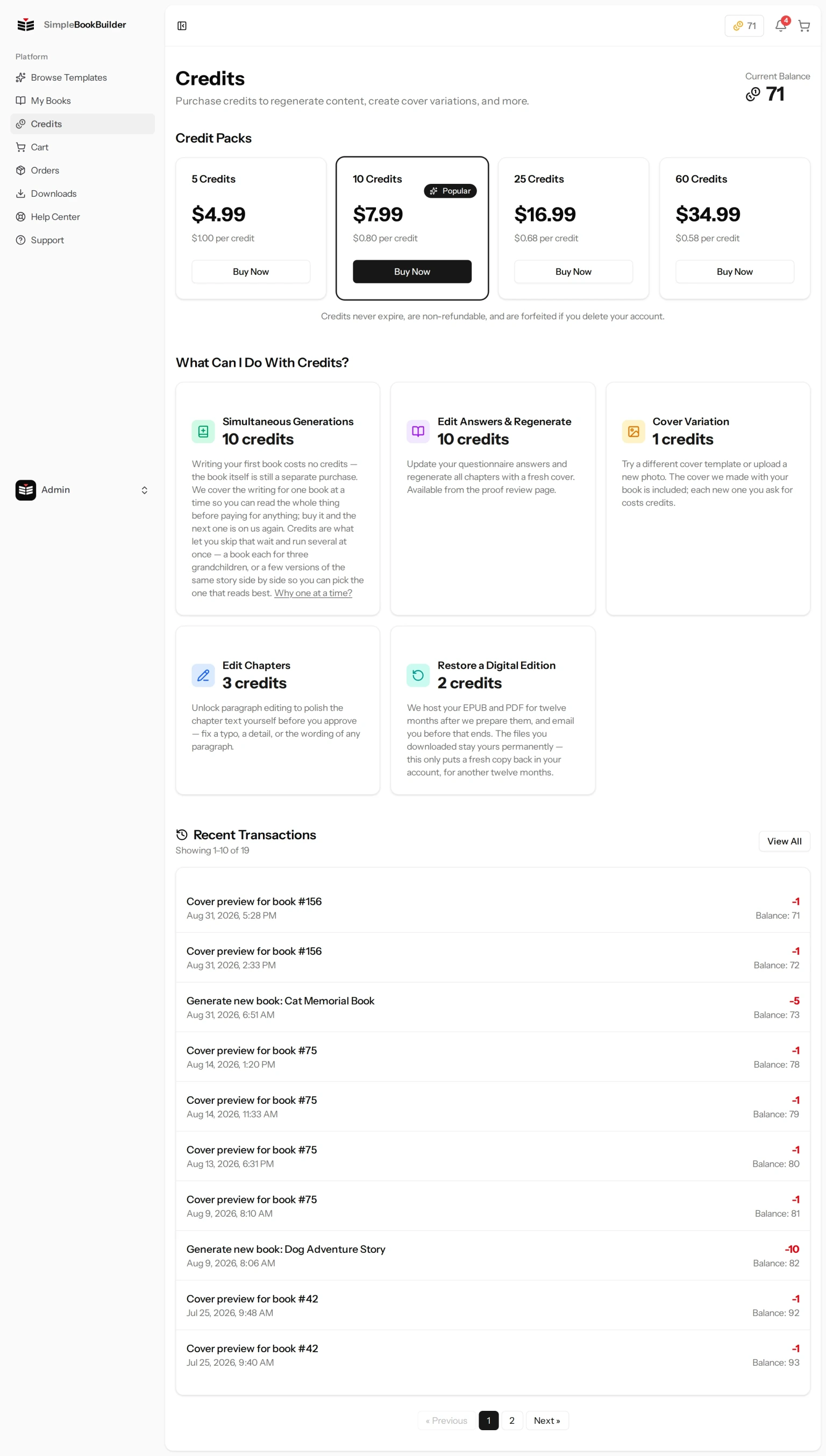
- Generating a New Book — Needed to start a book before you have bought your previous one. Otherwise generation is normally free. The cost depends on the edition you chose: 10 credits for an edition we write for you from scratch, 5 credits for one that needs no new writing.
- Edit Answers & Regenerate — Make the book again from changed questionnaire answers. 5 credits for the Journal Edition or a Ready-Made Story, where your new answers are put into the same pages and nothing is rewritten; 10 credits for Written For You, where every chapter is written again with the new details. The button is on your proof page.
- Switching to an Edition That Needs No New Writing — Changing a book to a Journal Edition, whose pages are laid out rather than written, or to a Ready-Made Story, With Your Names in It, which is a complete story written in advance with your names put into it. Where a template offers it, there is also a Ready-Made Story, Fitted to You, the same ready-made story with some of its sentences fitted around your answers. All three cost 5 credits. It is the cheaper price because nothing has to be written for you, not because there is nothing to read — a ready-made story is a full book.
- Switching to Written For You — Changing a book to the edition that is written for you from scratch. 10 credits, the same as any regeneration, because the whole thing has to be written.
- Polish Paragraphs — A one-time unlock per book that lets you edit individual paragraphs by hand instead of regenerating. 3 credits. The button on your proof page is Polish Paragraphs. See Polishing Individual Paragraphs.
- Change Page Style — Change the page color or the printed edge design before you approve the book. 3 credits. The button is on your proof page, and it is there whether or not you have credits — you will only be asked to spend them when you confirm the change. See Page Style and Printed Edges.
- Change Cover — Generate a different AI cover design if you are not happy with the current one. 1 credit each, from the very first one. The cover that came with your book was the free one; every replacement after that is charged. See Choosing Your Cover Art.
- Restoring a Digital Edition — 2 credits, from your Downloads page, once the hosting window has closed.
- Restoring an Audiobook — 10 credits, from your Downloads page, in the same voice you originally chose.
Those button names are the desktop ones. On a narrow phone screen they drop their first words to fit, so Polish Paragraphs reads just Paragraphs, Change Page Style reads Page Style, and Edit Answers & Regenerate reads Regenerate. Same buttons, same prices.
The Credits page has a What Can I Do With Credits? section with the price of some of the common ones. It is a summary: it does not list every action, and if its wording ever disagrees with what you are about to be charged, the screen in front of you is the one that is right. The price you should trust is the one you are shown when you are about to spend — the confirmation box for that particular action, or, on the Downloads page, the number written on the Restore button itself.
What Credits Cannot Buy
Credits do not buy printing, shipping, a Digital Edition or an Audiobook. Those are bought with money at checkout, and there is no way to convert credits into any of them. Restoring an expired download is the one thing that looks like an exception and is not: it re-hosts something you already bought, rather than buying it. Credits also cannot pay for a different audiobook voice, which is a new purchase rather than a restore.
Your Credit Balance
Once you are signed in, your balance is on every page of your account:
- The bar across the top of the page — A small coin badge on the right showing the number you have. It sits to the left of the notification bell, with your cart at the far right. Clicking the badge opens the Credits page.
- The Credits page — Your full balance at the top, under Current Balance. You can also reach it from the sidebar, where it is listed as Credits.
Public pages, such as the template listings you can browse without signing in, do not show that bar at all.
Still have a question?
Support tickets are part of your account. Log in or create a free account to open one.