Viewing Your Orders
How to find your order history, read an order card, and understand the order number, the status badge, the tracking number and the First Print and Reprint badges.
Viewing Your Orders
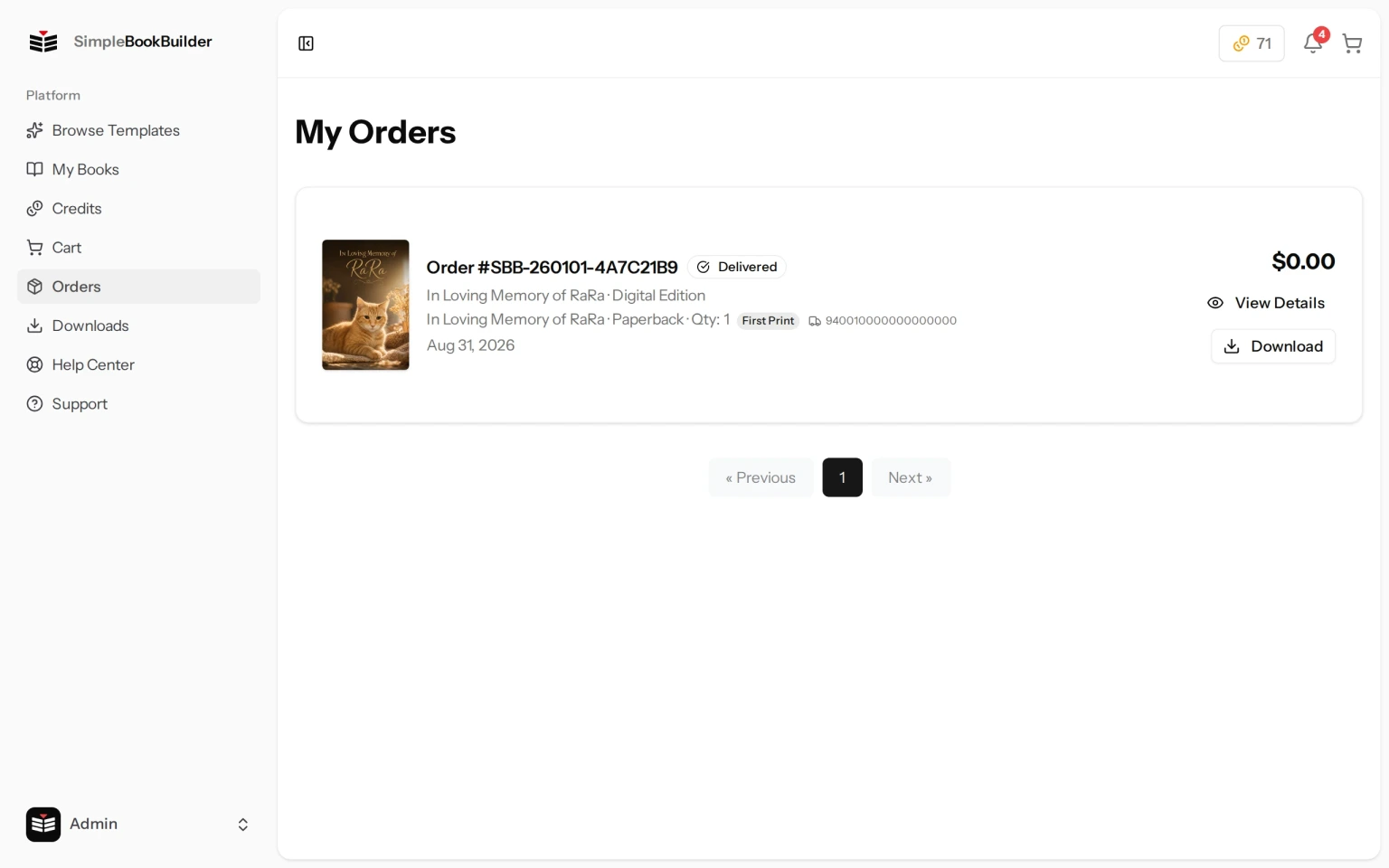
The Orders page, headed My Orders, shows all the orders you have placed, from most recent to oldest.
Order Cards
Each order card displays:
- Order number — The order’s own reference. It is a long one, not a short count: it starts with SBB, then the date, then a run of letters and numbers, and the page shows it as something like Order #SBB-260917-A1B2C3D4. Quote the whole thing when you write to us, and copy it rather than retyping it — the last part is deliberately random.
- Status badge — The overall state of the order: Pending, Paid, Processing, Shipped, Delivered or Canceled.
- Item details — One line per item: the book title, then what that line is, then the quantity. A printed copy reads Paperback or Hardcover. A Digital Edition reads Digital Edition and an Audiobook reads Audiobook (MP3), each with no quantity, because there is nothing to count. Nothing is being printed or mailed for either of them.
- First Print or Reprint — Every printed copy carries one of these two small badges. It reads First Print the first time you order that book and Reprint every time after, so it is always there rather than only on a reorder. A Digital Edition or Audiobook line carries neither, because nothing is printed.
- Tracking number — Shown on a printed line once it has shipped. Before that you may instead see a short word from our printer, such as PRESS or BINDERY, saying where that copy is in the workshop. Order Details & Tracking covers those words.
- Date — When the order was placed.
- Total price — The amount you paid.
- View Details button — Opens the full order detail page.
- Download button — Appears when the order includes a Digital Edition or an Audiobook, and takes you to your Downloads page.
Pagination
If you have many orders, they are split across pages. Use the pagination links at the bottom to navigate between pages.
Still have a question?
Support tickets are part of your account. Log in or create a free account to open one.