Exporting Your Data
Download a ZIP copy of your personal data: your answers, orders, support tickets, uploaded photos and any Digital Edition or audiobook you bought.
Exporting Your Data
You can download a copy of your personal data whenever you want, without asking anyone. This is your right under privacy laws including GDPR and CCPA/CPRA, and it is a self-service button rather than a request we have to approve.
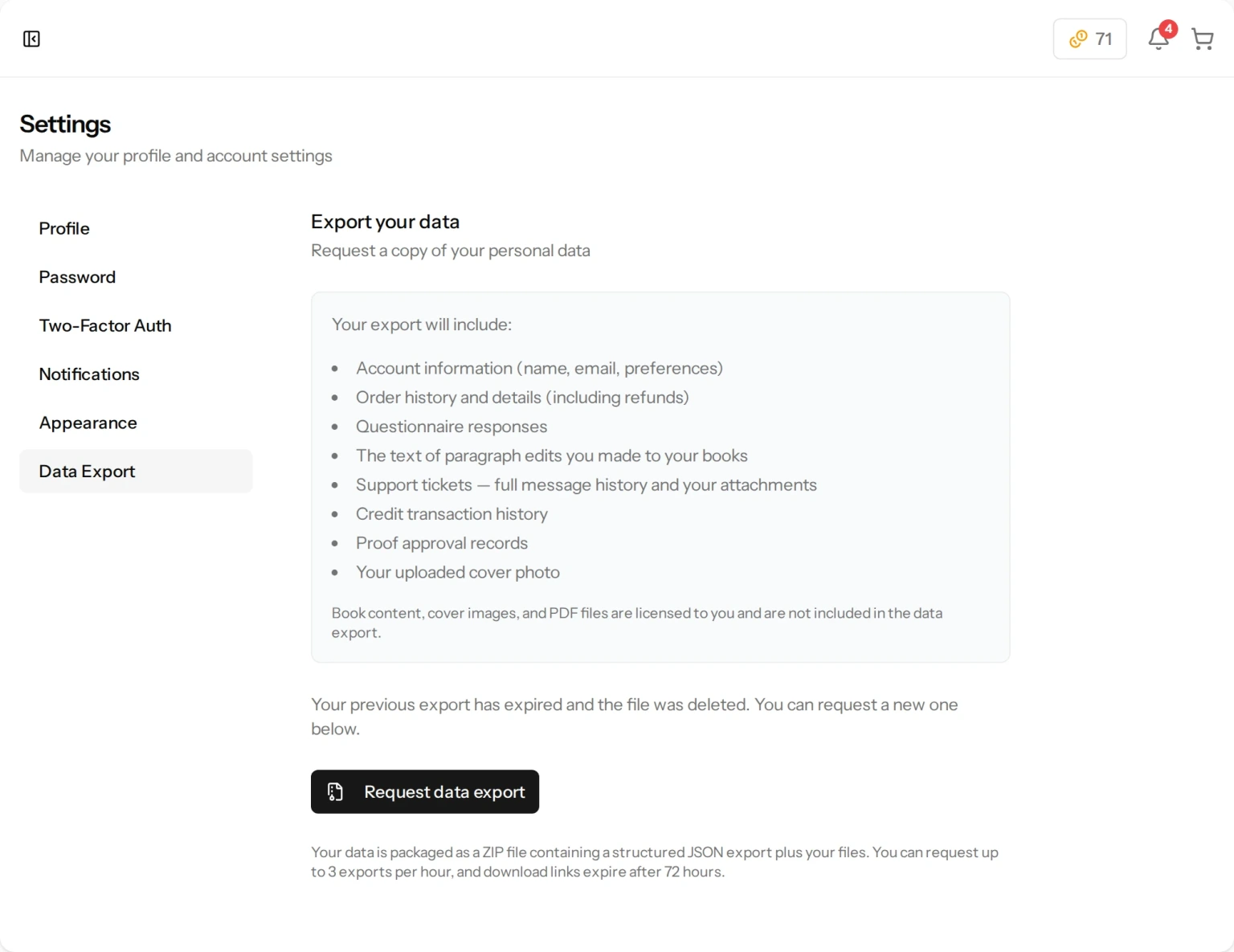
How to Export
- Go to Settings from the menu at the bottom of the sidebar.
- Open the Data Export tab.
- Click Request data export.
- We build your package in the background. How long that takes depends on how much there is to gather — a purchased Digital Edition or audiobook has to be copied into it — so leave the page open and it will update by itself when the file is ready. We also email you and add a notification in the app.
- Click Download my data to get the ZIP file.
The download link expires 72 hours after the package is ready, and the file is deleted at that point. That is deliberate — a package full of your personal data should not sit on our servers indefinitely. If you miss the window, simply request a new one.
Only one package is prepared at a time, so if you ask again while one is still building we tell you it is already on the way. Requests are capped at 3 per hour, which is only there to stop the button being hammered.
What Is in the ZIP
The ZIP holds a structured data file plus the actual files that belong to you.
In the data file:
- Account information — your name, email address, email preferences and the IP address you registered from.
- Order history — every order with its items, quantities, prices, shipping address, carrier and tracking number, delivery dates, and any refunds.
- Questionnaire responses — the answers you gave for each book.
- Unfinished drafts — the answers on any book you started in the wizard and have not finished.
- Paragraph edits — the wording you wrote yourself when polishing a paragraph.
- Your printed-edge text and pattern choices.
- Support tickets — the full message history of every ticket.
- Credit transaction history — every credit purchase and every credit spent.
- Proof approval records — when you approved a book, and the exact wording of what you agreed to.
- Digital Edition records — what you bought, when it was ready, how many times you downloaded it and when you last did.
- Reviews you wrote — your rating and words, the name you chose to show, your consents, and whether the review is published.
And the real files themselves, sorted into folders inside the ZIP so you can find them:
- Your profile photo, if you uploaded one — in a folder called profile.
- Cover photos you uploaded — in that book’s own folder inside books, which is named after the book.
- A cover photo on a book you started but never finished — in wizard-drafts, named after the template you were using, because there is no finished book to file it under.
- Images you attached to support tickets — in tickets, one folder per ticket number.
- A photo you added to a review — in reviews.
- Digital Editions you bought — the files themselves, in that book’s folder: the EPUB and the PDF, or the PDF alone for a journal made only of writing pages.
- Audiobooks you bought — the MP3 itself, in that book’s folder.
So the export doubles as a second way to get your purchased files, alongside the Downloads page in the sidebar. What it can hold, though, is whatever we are actually holding for you at that moment. The export copies the file we have; it does not make one.
That means a purchased file can be missing from the ZIP in three situations. In the first two, nothing has gone wrong:
- Your download window has closed. We host a Digital Edition and an audiobook only for a limited time, and the files are deleted when that time is up, so there is nothing left to put in the ZIP. The record of the purchase still appears in the data file, and the Downloads page offers to restore the file for credits — once it is back, a fresh export will contain it.
- The purchase was refunded or charged back. The record of it stays in the data file, but the file itself is left out, because the right to download it ended when the money went back.
- The file is not ready yet. A Digital Edition and an audiobook are both built after you buy them, so an export taken in the meantime has nothing to put in the ZIP. Wait for the email telling you it is ready, then export again. If a file is still not ready long after you bought it, the problem is with that file and not with your export: the Downloads page shows a Get this fixed button beside it, which takes you to Support where you can open a ticket, and we repair it at no charge. Restoring for credits will not mend a file that was never built — restoring is only for a download window that has closed.
What Is Not Included
Your export contains what you gave us. It does not contain the things we made:
- The written chapters of your books.
- Cover artwork and other generated images.
- The print-ready PDF of a printed book.
These are licensed to you rather than being your personal data, which is why they sit outside a privacy export. This is not a way of keeping them from you: if you bought a Digital Edition or an Audiobook, those files are in the ZIP, as above. To read a book you have not bought a digital copy of, open My Books in the sidebar and click the book — that opens its proof, where you can read the pages.
If you need something that is not in the export, open a ticket from Support in the sidebar and tell us what you are looking for.
Still have a question?
Support tickets are part of your account. Log in or create a free account to open one.