Order Details & Tracking
Understanding the order detail page — items, print stage badges, what Delayed means, payment, shipping address, and tracking.
Order Details & Tracking
Click View Details on any order card to see the complete order information.
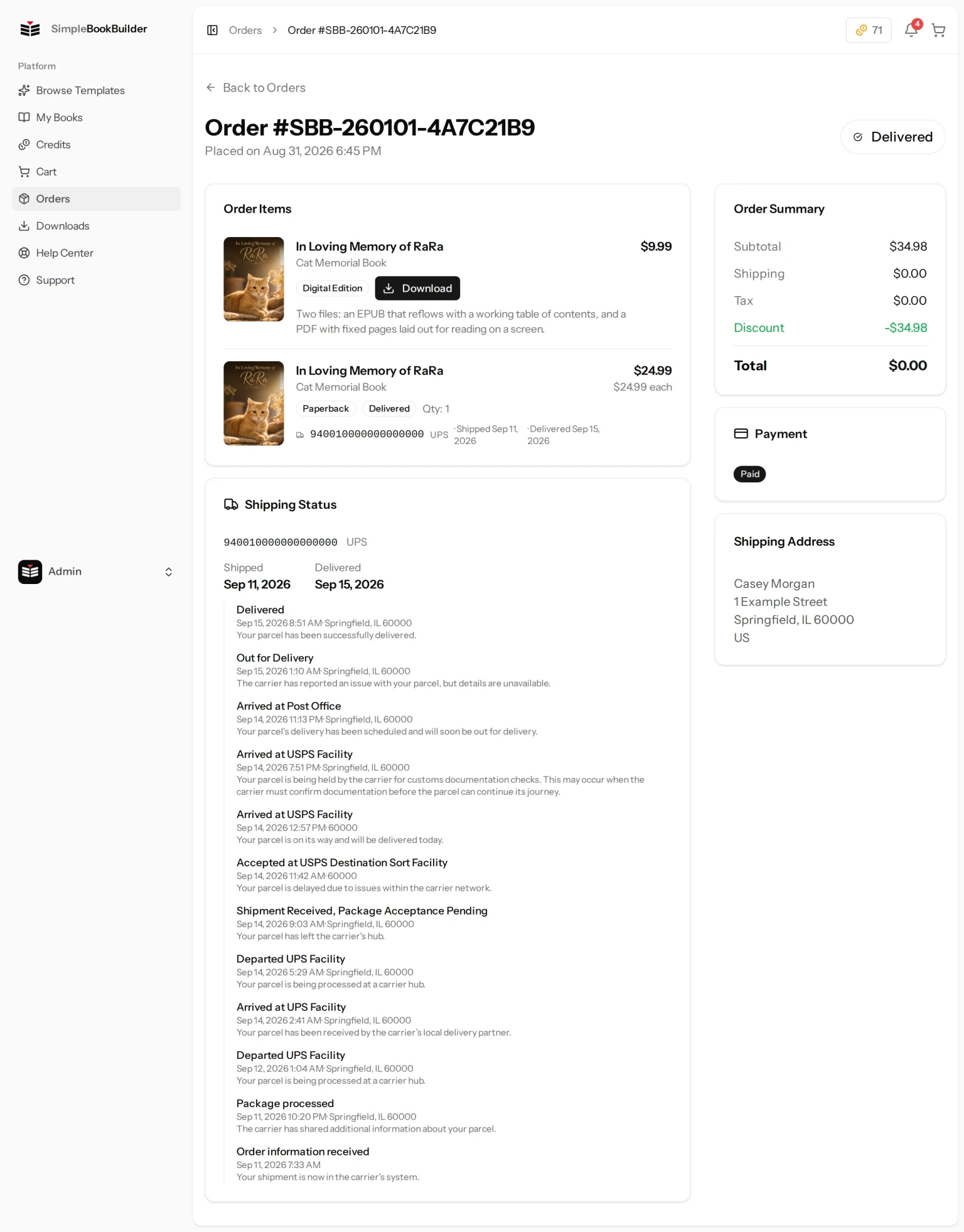
Order Items
The main section lists each item in the order:
- Book cover and title with template name.
- Binding badge — Paperback or Hardcover on a printed copy. A Digital Edition line reads Digital Edition here instead, and an Audiobook line reads Audiobook (MP3). The two paragraphs after this list explain both.
- Print stage badge — Where this particular copy is right now. It is more detailed than the order status, and it is the badge to watch while your book is being made. See the next section, because it does not always show a word we wrote.
- Quantity ordered.
- Tracking information — Once shipped, shows the tracking number itself as the link to the carrier’s page, the carrier name, and the ship and delivery dates as they arrive.
- Price — Per-unit and total for that item.
A Digital Edition line looks different on purpose. It has no print stage and no quantity — there is nothing being made and nothing to ship — so instead it carries a Download button that takes you to your Downloads page. See Digital Editions.
An Audiobook line is the same. It reads Audiobook (MP3) and has no print stage and no quantity — there is no press, no bindery and no tracking number coming — and it carries a Download button in their place. Your recording appears on your Downloads page when it is ready, and we email you then. See Audiobooks.
What the Print Stage Badge Says
Before your book reaches the press, the badge shows one of our own words: Pending, Submitted, Accepted or In Production.
Once it is actually on the floor at our printer, the badge switches to the printer’s own word for the stage it is at, passed straight through. So you may see something that looks like internal shorthand — PRESS or BINDERY, for example. Nothing is wrong when that happens. It is simply the most current, most specific thing anyone knows about your book: where it physically is in the workshop.
When your copy reaches an end state, the badge goes back to a plain word: Shipped, Delivered, Canceled or Delayed.
If You See “Delayed”
Delayed means this copy hit a snag at the press and our team has already been alerted. The copy needs to be re-run, and someone is on it. The page says the same next to the badge, and invites you to get in touch for an update at any time. You are welcome to; you do not have to wait for us, and you can open a ticket from the Support page.
If a paid copy turns out not to be producible at all, you can have it reprinted or have your money back — whichever you prefer. See Refunds & Returns.
Order Summary Sidebar
The right sidebar shows the financial breakdown:
- Subtotal — Item costs before shipping.
- Shipping — Delivery charges.
- Tax — Any applicable taxes.
- Discount — Shown in green if a discount was applied.
- Total — The final amount charged.
Payment & Shipping
Below the summary you will find:
- Payment Status — Whether the payment has been completed (Paid) or is still pending.
- Shipping Address — The full delivery address for this order.
- Shipping Status — Shipped and delivered dates when available.
Still have a question?
Support tickets are part of your account. Log in or create a free account to open one.